RAAMP

RAAMP features

The operating system behind accounting, CAM recs, files, and artificial intelligence.

RAAMP is built to keep operations, accounting, documents, tenant activity, franchisor controls, and decision-making in one system. This page is a full capability map of the platform, organized so teams can quickly see both the scope and the practical depth of the solution.

One platform for the records, workflows, dates, files, communications, and reporting that drive the business.

Built to stay organized at the portfolio level without losing the detail work underneath it.

What this page covers

  • Portfolio structure, ownership profiles, territories, operational CRM, lease oversight, and tenant workflows
  • Accounting, royalty collection, CAM reconciliations, vendor management, 1099s, recurring billing, and reporting
  • Desktop file access through Virtual Drive over WebDAV, OCR, phone-camera scanning, payment rails, signatures, and artificial intelligence
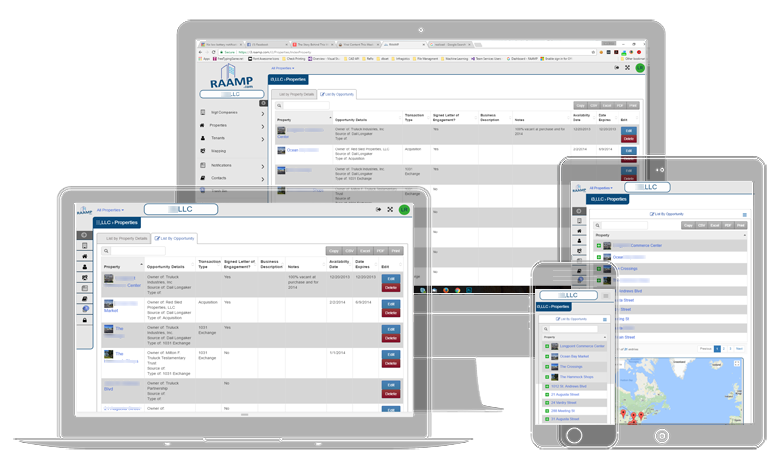
RAAMP features overview

Portfolio control

Organize companies, ownership profiles, properties, territories, tenants, and operating history from one core system.

RAAMP gives operators a structure that can handle multi-entity ownership, franchisor and franchisee relationships, property-level detail, tenant-level records, and the supporting contacts, dates, files, and notes that normally get scattered.

Entity and portfolio structure

  • Master company, company, property, tenant, location, and contact organization in one hierarchy
  • Support for multi-entity operations with separate accounting entities and shared oversight
  • Ownership profiles that keep owner, manager, franchise, and decision-making relationships visible at the record level
  • Company access routing so each organization lands in its own RAAMP environment
  • Property records, layout pages, area measures, and supporting entity detail tied to operations
  • User and subcompany management for growing teams and distributed operating models

Franchise and ownership control

  • Territory mapping for franchisors who need to visualize territory coverage, assigned operators, and growth boundaries
  • Location-level structure that helps franchisors monitor brand presence across multiple operators
  • Ownership and responsibility visibility across franchisor, franchisee, entity, property, and location relationships
  • Multi-location rollups that let teams see portfolio, brand, and entity performance from one system
  • Record structures that keep royalty, location, and operational workflows tied together instead of split across tools

Operational CRM and location visibility

  • Operational CRM for managing contacts, follow-up, notes, reminders, and relationship history around the work
  • Landing pages, quick links, and role-based access to keep high-frequency work close at hand
  • Property tabs, tenant tabs, company views, and organized navigation around real workflows
  • Centralized contacts, notes, notifications, comments, and history attached to the relevant records
  • Property layout page views that make it easier to visualize a location, suites, units, and physical relationships
  • Searchable records that reduce the time spent chasing information across disconnected tools

Teams use this layer to keep the portfolio map, the ownership story, the operational CRM, and the location context aligned instead of rebuilding the same facts in multiple places.

Lease administration

Move from lease detail to recurring operational control without leaving the platform.

RAAMP is built for the ongoing management work that follows lease setup, not just the initial record. Terms, dates, clauses, bill-backs, options, and follow-up actions stay tied to the tenant and property.

Lease and term management

  • Lease abstraction workflows designed to capture operational and financial lease detail
  • Term screens for general terms, financial terms, options, percentage rent, insurance, and related data
  • Support for clause-oriented data capture and reusable operational patterns
  • Tenant-specific accounting, terms, files, and financial records from one tenant view
  • Property and tenant insurance tracking with compliance-oriented recordkeeping

Key dates and recurring events

  • Date-driven monitoring for expirations, renewals, notice windows, and monthly tasks
  • Option period tracking, escalation timing, and rent schedule follow-through
  • Expiring rents visibility and calendar views that keep upcoming obligations visible
  • Dependent task creation for operational sequences that should not rely on memory alone
  • Notifications and reminders tied to the underlying records instead of separate task silos

In practice, RAAMP lets teams move from the lease file to the daily management work without losing continuity between the legal record, the finance record, and the action list.

CAM and revenue

Handle reconciliations, recoveries, royalties, sales-driven billing, and recurring charges from one operating base.

RAAMP supports the charge structures that make commercial real estate and franchise operations harder than plain invoicing. Estimates, true-ups, percentage rent, and recurring billing logic all live close to the source records.

CAM reconciliations and recoveries

  • Create and manage reconciliations with screens oriented around charge review and follow-up
  • Track property CAM expense detail and tenant bill-backs without breaking the workflow apart
  • Import rents and CAM estimates into budgets to compare planning against executed charges
  • Update estimated charge amounts as assumptions change through the year
  • Keep supporting documents, notes, and tenant communication tied to the reconciliation process

Revenue operations, royalties, and recurring billing

  • Revenue operations module support for company account settings and recurring billing structure
  • Royalty collection workflows for franchisors managing periodic royalty billing across locations
  • Memorized invoices, invoice groups, and recurring invoice maintenance for predictable billing
  • Generate invoices, receive payments, and handle credits, overpayments, and adjustments
  • Support for sales, percentage rent, option-based changes, escalation-driven billing logic, and franchise royalty calculations
  • Show previous balances, apply deposits, and manage collection-oriented workflows inside the platform

This is where RAAMP earns its keep for teams that need CAM recs and recurring revenue to connect back to the lease, the tenant, and the accounting record without manual stitching.

Accounting and finance

Run multi-entity accounting with the operational context still attached.

RAAMP covers the accounting workflow beyond a general ledger snapshot. Receivables, payables, banking, check runs, invoices, budgets, reconciliations, and search tools stay connected to the rest of the business.

Core accounting workflows

  • Accounts, chart of accounts, journal entries, trial balance imports, and ledger reporting
  • Accounts receivable and accounts payable workflows with aging, payment handling, and adjustments
  • Deposits, refunds, bounced checks, payment methods, payment terms, and bank account management
  • Check printing, print template support, and transaction search across accounting activity
  • Tenant accounting and property accounting views that keep operations tied to financial data

Analysis, budgets, and cash flow

  • Budget creation, actual imports, column projections, and account-row updates
  • P&L with cash flow support and reporting for operating review
  • Rent roll, rent collection, and receivable visibility linked to portfolio structure
  • Financial analysis screens for escalations, sales, percentage rents, and option impacts
  • Power BI connection support and export paths for deeper reporting layers

Vendor management and 1099s

  • Vendor records, contacts, notes, payment terms, and supporting files maintained inside the accounting workflow
  • Vendor approval and payable workflows aligned to the entity, property, and operational structure
  • 1099 classification, year-end review, and filing-oriented recordkeeping tied to vendor history
  • Tax1099.com integration support for streamlined 1099 submission from RAAMP-managed vendor data
  • Searchable vendor and payment history for audits, corrections, and year-end cleanup

Operators use this layer when they need real accounting control without losing the ability to trace every balance back to the tenant, property, file, and workflow behind it.

Files and desktop access

Keep documents in the operating system and make them accessible from the desktop when people need to work fast.

RAAMP includes file management as part of the day-to-day workflow. Documents stay attached to the right entities, can be shared appropriately, and can move through OCR, scanning, and Virtual Drive access patterns that expose RAAMP files on the desktop through WebDAV.

Document control

  • Entity-linked file storage for companies, properties, tenants, and other operating records
  • Folder structures, upload flows, file history, sharing, and deletion recovery support
  • Current file plus version history views so edits do not erase the operating trail
  • Share files internally or with tenants while keeping the relationship to the underlying record
  • Trash and restore workflows that help protect accidental deletion from becoming data loss

Capture and desktop accessibility

  • OCR support for PDFs so teams can work from searchable document content
  • Phone camera scanning to bring paper into the system quickly when work starts in the field
  • Virtual Drive makes RAAMP files accessible from the desktop like OneDrive or Dropbox, but using WebDAV technology connected to your RAAMP environment
  • Desktop-friendly access patterns for teams that want files available without hunting through a browser first
  • Document editor and viewer support for file handling inside the RAAMP workflow
  • File sharing and access notifications that keep collaboration tied to the same record base

Teams use this to keep lease files, supporting records, compliance documents, billing backup, and tenant-facing material in one controlled operating context.

Tenant communication

Support tenant-facing workflows without separating communication from the record system.

RAAMP includes tenant portal and communication capabilities so payments, notices, shared files, and day-to-day interactions stay attached to the tenant history.

Tenant portal workflows

  • Tenant portal access, first-time login flows, and tenant-user management
  • Worldpay-powered payment rails inside the tenant portal so payment collection stays attached to tenant balances and activity
  • Tenant-facing payment workflows and shared file access
  • Portal-linked tenant files and financial visibility where appropriate
  • Self-service access patterns that still keep the operator in control of the underlying records
  • Shared activity paths that reduce back-and-forth across email chains and disconnected portals

Communication and outreach

  • Notifications, notification settings, and tenant-specific outreach support
  • Text communication tooling and phone-linked workflows inside RAAMP
  • Contact records, vCard exports, and relationship-oriented notes around tenants and properties
  • Calendar-linked activity and reminder visibility around tenant obligations and team follow-up
  • Communication trails that stay close to the records they are about

The goal is not just outbound messaging. It is maintaining a tenant relationship record that spans payments, files, reminders, and follow-up work in one place.

Collaboration and execution

Give teams a shared operating memory through tasks, calendars, forms, signatures, and notebooks.

RAAMP helps teams work together around the same records instead of passing spreadsheets and status notes through side channels that never make it back into the core system.

Team coordination

  • Tasks, dependent tasks, calendars, and date-linked coordination across operational work
  • Notifications and comments attached to the relevant record instead of general inbox clutter
  • Notebooks for keeping evolving context, decisions, and supporting notes inside the platform
  • Change history and validation-oriented views for teams that need accuracy and oversight
  • Quick links and landing controls that let users shape high-frequency navigation around their role

Structured work collection

  • Forms and form setup to standardize repeatable internal or external data collection
  • Dropbox Sign-backed e-signature workflows and signing-order support for executable documents
  • Signature request handling connected to the related records and files
  • Review, submission, and workflow control that keep structured intake inside RAAMP
  • Settings and tool areas that support ongoing process refinement without rebuilding the whole stack

This layer gives teams a shared place to execute, document, and hand off work so institutional knowledge does not disappear when one person leaves a thread or meeting.

Form module

Think Jotform, but integrated into the operating system you already run on.

RAAMP includes a lightweight, easy-to-use forms module designed to replace external form tools when the submission really belongs inside your ERP. Because the forms live in RAAMP, the records, files, reminders, notes, and follow-up work can stay connected to the same operating context.

Form building and distribution

  • Forms module designed to replace external tools like Jotform or spreadsheet-driven intake workflows
  • Seamless embedding on your own site so external users can submit into RAAMP-connected workflows
  • Support for both internal and external users depending on who needs to submit the information
  • Automated reminders for scheduled reports or repeat submissions when follow-up should not depend on memory
  • Integrated review and workflow controls so submissions stay inside the same operating system instead of landing in a disconnected inbox

Operational use cases

  • Maintenance requests that can be tied back to the location, tenant, property, and follow-up tasks
  • New tenant or client intake workflows so onboarding details land directly in RAAMP instead of a side tool
  • Interest forms, store-level requests, recurring reports, and other location-driven intake patterns
  • Internal collection workflows for approvals, updates, audits, and operating checklists
  • Form submissions that can feed the same notebooks, notifications, files, and action trails teams are already using

The difference is not just that RAAMP can collect form data. It is that the form results can immediately live where the rest of the work already lives.

Project management

Run project P&L, time tracking, costs, and burndown-oriented visibility from the same platform.

RAAMP supports project management workflows for teams that need both execution tracking and financial visibility. This is especially useful for opening new stores, construction work, rollout programs, or any other initiative where time, cost, and deadlines need to stay tied together.

Project setup and financial control

  • Project records with name, code, description, status, company or property association, and assigned project manager
  • Hourly or fixed-price project structures with estimated hours, default rates, and billable calculation support
  • Project-linked accounting references so budgets, invoices, credits, and bill-or-credit records can be tied back to the job
  • Project P&L workflows and budget reporting patterns that help operators see costs and profitability by project
  • Tags, due dates, overdue visibility, and organized project structure for multi-job environments

Time tracking and delivery visibility

  • Start-stop timers, manual time lines, running timers, and weekly timesheets tied directly to projects
  • Tracked hours by project so labor effort is visible instead of estimated after the fact
  • Cost visibility and burndown-oriented reporting for teams that need to monitor pace against budget and deadlines
  • Useful for opening new stores, construction, special initiatives, and rollout programs where execution discipline matters
  • Project work that stays connected to the same accounting, record, and reporting environment instead of splitting between PM software and ERP software

RAAMP gives teams one place to manage the job, track the time, measure the cost, and see the financial story behind the project as it moves.

Connected workflows

Use connected services without disconnecting the operating system.

RAAMP works best when payables, signatures, 1099 filing, and payment collection stay tied to the same records, approvals, accounting entities, and operating history already living in the platform.

AvidXchange workflows

  • AvidXchange connectivity for bill pay processes that still need to stay aligned to RAAMP approvals and accounting structure
  • Vendor and payable context remains anchored to the same records your accounting team already uses
  • Connected AP workflows reduce the need to rebuild bill-pay history outside the operating system

Dropbox Sign workflows

  • Dropbox Sign support for signature routing that stays tied to the file, request, and operating record
  • Signature execution can move through RAAMP without making documents disappear into a separate tool chain
  • Status visibility and signing workflows stay closer to the rest of the collaboration process

Tax1099.com workflows

  • Tax1099.com integration support for year-end filing tied to the same vendor records and accounting data already maintained in RAAMP
  • 1099-oriented review can happen without exporting the business memory into a disconnected scramble
  • Year-end compliance work becomes easier when vendor, payment, and filing context live together

Worldpay-powered tenant payment rails

  • Worldpay powers the payment rails for the tenant portal so collection can happen inside the RAAMP experience
  • Payment activity stays closer to tenant balances, files, notices, and operational follow-up
  • Tenant-facing payment workflows do not have to break the record trail to remain usable

These connected workflows matter because the integration point is not the whole story. RAAMP keeps the surrounding approvals, records, files, and accounting context in one place too.

Artificial intelligence and document intelligence

Use artificial intelligence close to the documents and records people are already working in.

RAAMP includes artificial intelligence and document-intelligence patterns that make more sense because they sit inside an organized ERP instead of outside it. The file, the entity, and the operational context are already present.

Artificial intelligence workflows

  • Artificial intelligence support tied to document and file workflows for context-aware interaction
  • Conversation reset and thread-based interaction models designed for repeated use
  • Document-oriented AI patterns that help teams inspect, summarize, and work through file content
  • Operational AI positioned as a workflow tool inside RAAMP rather than a disconnected novelty
  • Repeatable structure that makes AI more useful because the surrounding records are organized

Structured intelligence inputs

  • OCR support to convert static documents into more usable source material
  • Lease-analysis prompt infrastructure and AI-ready operational artifacts inside the codebase
  • Document capture, storage, and retrieval paths that make files easier to work with over time
  • File-linked context that keeps AI outputs closer to the operating record they came from
  • A platform posture designed for continuous improvement instead of disconnected point experiments

Artificial intelligence is strongest here because it can work from real files and real business structure, not just pasted snippets with missing context.

Reporting and admin

Export, map, search, report, and administer the platform without breaking the workflow apart.

RAAMP rounds out the operating stack with reporting, mapping, search, admin tooling, and setup features that make the rest of the platform easier to govern and scale.

Reporting and analysis outputs

  • Reports, rent rolls, aging reports, financial exports, and operational review tools
  • Search-all-transactions visibility for research and troubleshooting work
  • Excel-friendly export paths that let operators continue downstream analysis where needed
  • Mapping and GIS-oriented workflows for spatial review and market-context analysis
  • Dashboards and review screens that help leaders see what needs action next

Administration and technical control

  • API credentials, testing utilities, and JSON viewer support for controlled extension
  • User management, company-user administration, and environment-level controls
  • Setup tooling for forms, revenue operations, and company-specific workflow configuration
  • Validation mode, debug-oriented utilities, and operational support tooling in the platform
  • Searchable, organized support documentation across accounting, files, portal, OCR, notifications, and more

RAAMP is designed to be run, reviewed, and extended as a full operating environment, not just used as a narrow transactional app.

See the full platform in context

Features matter more when they live in one organized operating system.

If you want to see how these capabilities fit together for your portfolio, your accounting entities, and your tenant workflows, the next step is a guided RAAMP walkthrough.